Quick Answer
Date Outside Tatkal ARP (error 50018) means you selected a journey date that isn't tomorrow. Tatkal tickets can only be booked for the next day. Change your date to tomorrow and try again after 10:00 AM (AC) or 11:00 AM (Sleeper).
What This Error Actually Means
When IRCTC displays "Date Outside Tatkal ARP (50018)", the system is telling you that your booking request failed a specific validation check. Let's break down what's happening:
ARP stands for Advance Reservation Period—the window of time during which you can book tickets. For Tatkal quota, this window is exactly 1 day. This isn't 24 hours from now; it means the calendar date immediately following today.
Error! Date outside Tatkal ARP- (50018)
The server performs this check on every Tatkal booking request:
This validation runs before checking seat availability, payment, or anything else. If the date doesn't match, you get error 50018 immediately.
Why the 1-Day Rule Exists
Indian Railways introduced Tatkal in 1997 to help passengers who need to travel urgently. The word "Tatkal" means "immediate" in Hindi. The 1-day restriction serves several purposes:
- Prevents hoarding: Without this limit, agents could book Tatkal seats weeks in advance and resell them
- Ensures genuine emergency use: The short window means only people with actual urgent travel needs use the quota
- Maintains fairness: Everyone gets equal access on the same day, rather than first-come-first-serve over weeks
Regular advance booking (General quota) allows booking up to 60 days ahead. Tatkal's 1-day window is the tradeoff for getting last-minute seats when General quota is full.
Exact Timing: When Tatkal Booking Opens
The IRCTC server releases Tatkal quota at specific times based on the travel class:
| Class Type | Booking Opens | Journey Date |
|---|---|---|
| AC Classes (1A, 2A, 3A, CC, EC) | 10:00:00 AM IST | Next calendar day |
| Sleeper & Non-AC (SL, 2S) | 11:00:00 AM IST | Next calendar day |
Server time matters, not your device time. IRCTC servers use Indian Standard Time (IST). Even if your phone shows 10:01 AM, if the server time is 9:59 AM, Tatkal won't be available yet. You can verify server time by looking at the timestamp in the IRCTC page header.
Timeline Example: Booking on January 17, 2026
Real Screenshot Analysis
Here's an actual error 50018 captured during a booking attempt:
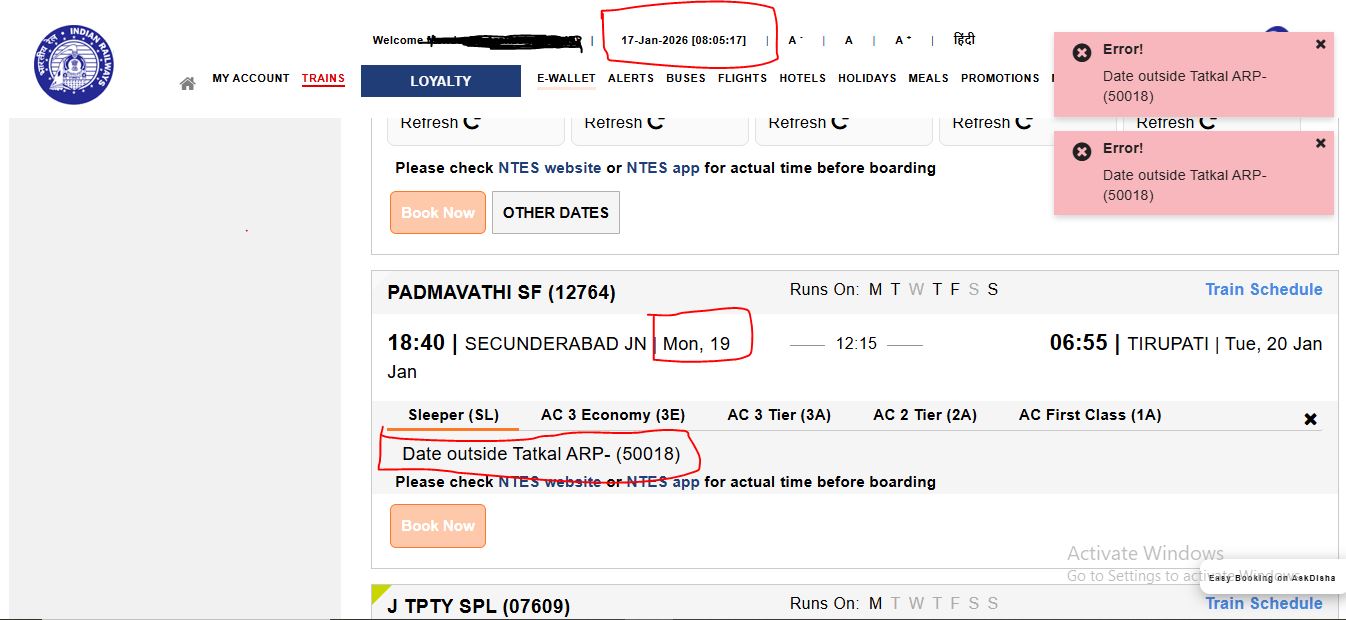
Let's analyze what went wrong in this screenshot:
| Field | Value in Screenshot | Analysis |
|---|---|---|
| Server Date/Time | 17-Jan-2026, 08:05:17 | This is the current date according to IRCTC |
| Selected Journey Date | 19-Jan-2026 (Mon) | ❌ This is 2 days ahead, not tomorrow |
| Valid Tatkal Date | 18-Jan-2026 | ✓ This would be the correct selection |
| Error Result | 50018 | Server rejected because 19 ≠ 17+1 |
The user wanted to travel on January 19, but tried using Tatkal on January 17. For January 19 travel via Tatkal, they would need to book on January 18 after 10:00 AM.
How to Fix This Error
The fix depends on your actual travel needs:
Scenario 1: You need to travel tomorrow
- Verify your journey date is set to tomorrow's date
- Wait until 10:00 AM IST (AC classes) or 11:00 AM IST (Sleeper)
- Select "Tatkal" or "Premium Tatkal" as the quota
- Proceed with booking
Scenario 2: You need to travel 2+ days from now
Tatkal won't work. You have two options:
- General quota: Book now using regular advance booking (opens 60 days before travel at 8:00 AM)
- Wait for Tatkal: Come back the day before your travel and book Tatkal then
Scenario 3: You need to travel today
Tatkal cannot help with same-day travel via the IRCTC website. Your options:
- Check current availability in General quota
- Visit the railway station and check at the counter
- Try RAC/Waitlist tickets if available
Common mistake: Many users try Tatkal at 10 AM for same-day travel, thinking "Tatkal means immediate." It doesn't work that way. Tatkal at 10 AM on Monday is for Tuesday travel, not Monday travel.
Why You Might Still Get Error 50018 at the Right Time
Even if you're booking at 10:00 AM for tomorrow, you can still see this error if:
- Your device clock is wrong: If your phone shows 10:05 AM but actual IST is 9:55 AM, the server will reject your request. Sync your device with automatic time.
- You selected the wrong date accidentally: Double-check the journey date field. The calendar picker sometimes defaults to unexpected dates.
- You're using cached page data: If you loaded the search page before 10:00 AM and didn't refresh, the session might have stale data. Do a hard refresh (Ctrl+F5).
- Server time zone issue: IRCTC servers use IST (UTC+5:30). If you're abroad and selected a date based on local midnight, it might not align with IST.
Tatkal vs Regular Booking: Quick Comparison
| Aspect | General Quota | Tatkal Quota |
|---|---|---|
| Advance Period | 60 days | 1 day (tomorrow only) |
| Booking Opens | 8:00 AM IST | 10:00 AM (AC) / 11:00 AM (Sleeper) |
| Extra Charges | None | 10-30% of base fare |
| Cancellation | Allowed with refund | No refund on cancellation |
| Best For | Planned travel | Emergency/last-minute travel |
Official Source
Reference: Indian Railways ARP Guidelines
Official IRCTC ARP Document (PDF) →
This document from IRCTC confirms the 60-day advance booking period for General quota and 1-day period for Tatkal.
Need Help Calculating Your Booking Date?
Our free calculator shows exactly when tickets open for any journey date.
Open Booking CalculatorFrequently Asked Questions
Can Premium Tatkal be booked earlier than regular Tatkal?
No. Premium Tatkal follows the same 1-day rule and opens at the same time (10 AM for AC, 11 AM for Sleeper). The difference is pricing—Premium Tatkal uses dynamic pricing based on demand, while regular Tatkal has fixed charges.
What if my train departs at 1:00 AM?
Use the train's scheduled departure date, not when you'll actually board. If the train departs at 1:00 AM on January 19, the "journey date" is January 19, and Tatkal booking would open on January 18 at 10:00 AM.
Does this error appear on the IRCTC mobile app too?
Yes. The validation happens on IRCTC's servers, so you'll see the same error 50018 whether you book via website, mobile app, or authorized agents.
Can I book Tatkal from a foreign country?
Yes, but remember that IRCTC uses IST (Indian Standard Time). Convert your local time to IST to know when Tatkal opens. The 1-day rule is based on IST calendar dates.